---
title: How to Enable Order History as an Exhibitor
description: Learn how exhibitors can enable order history in the Exhibitor Portal so users can view their past orders. Follow this simple step-by-step guide.
---
[Skip to content](https://help.vfairs.com/exhibitors/how-to-enable-order-history-as-an-exhibitor#main-content)
English
Show submenu for translations
Open main navigation
Close main navigation
- English
Show submenu for translations
How can we help you?
- There are no suggestions because the search field is empty.
1. [Exhibitor Knowledge Base](https://help.vfairs.com/exhibitors?hsLang=en)
2. [Trade Show](https://help.vfairs.com/exhibitors/trade-show?hsLang=en)
# How to Enable Order History as an Exhibitor
## Learn how exhibitors can enable order history in the Exhibitor Portal so users can view their past orders. Follow this simple step-by-step guide.
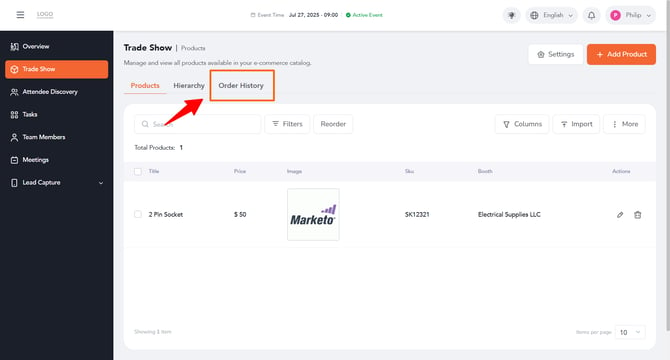
Order History allows your users to view a list of their past orders, including status and timestamps. This article walks you through how to turn on this feature from your Exhibitor Portal.
**Step 1: Log In to Your Exhibitor Portal**
Log in to your Exhibitor Portal using your credentials.
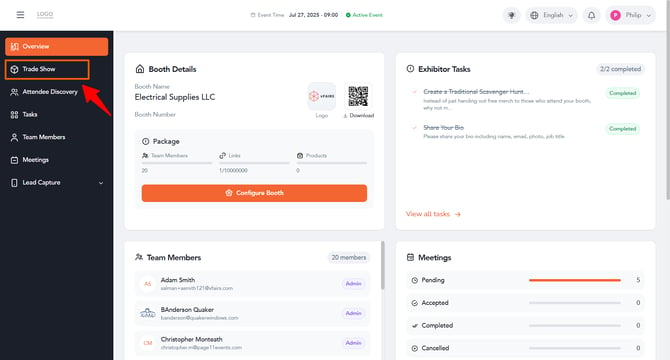
**Step 2: Open Trade Show**
On the left navigation menu, click **Trade Show**.
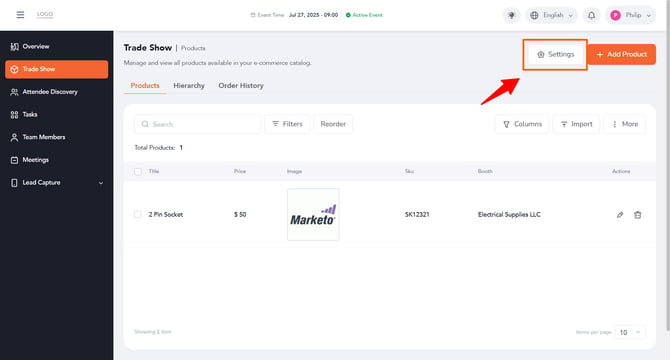
**Step 3: Open Settings**
At the top right of the screen, click the **Settings** tab.
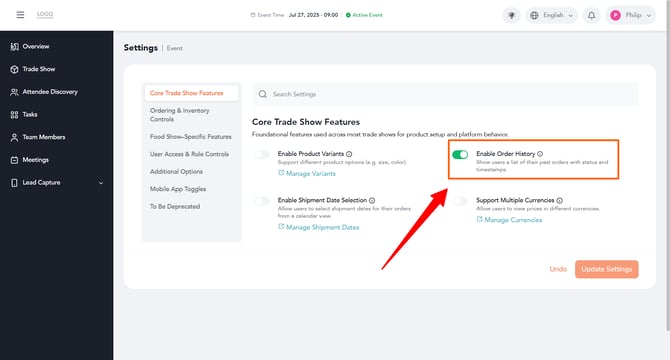
**Step 4: Turn On "Enable Order History"**
Under the **Core Trade Show Features** tab, find the **Enable Order History** option and turn on its toggle. This allows your users to see a list of their past orders, along with status and timestamps.
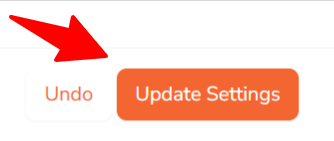
**Step 5: Save Your Changes**
Click the **Update Settings** button at the bottom right of the screen to save your changes.
That's it! You've successfully enabled Order History for your booth, and your users can now view their past orders along with status and timestamps on the Order History screen.
- [Overview/Exhibitor Dashboard](https://help.vfairs.com/exhibitors/overview-exhibitor-dashboard?hsLang=en)
- [Configure Booth](https://help.vfairs.com/exhibitors/configure-booth?hsLang=en)
- [Attendee Discovery](https://help.vfairs.com/exhibitors/attendee-discovery?hsLang=en)
- [Tasks Management](https://help.vfairs.com/exhibitors/tasks-management?hsLang=en)
- [Team Members](https://help.vfairs.com/exhibitors/team-members?hsLang=en)
- [Meetings](https://help.vfairs.com/exhibitors/meetings?hsLang=en)
- [Lead Capture](https://help.vfairs.com/exhibitors/lead-capture?hsLang=en)
- [Trade Show](https://help.vfairs.com/exhibitors/trade-show?hsLang=en)
[.webp?width=107&height=44&name=vfairs-logo-landscape-gradient-5%20(3).webp "vfairs-logo-landscape-gradient-5 (3)")](http://vfairs.com)
vfairs.com Help Center
Copyright © 2026, vFairs LLC