---
title: How to Export Leads as an Exhibitor
description: Learn how exhibitors can export their captured leads from the Exhibitor Portal and receive the report directly via email. Follow this simple step-by-step guide.
---
[Skip to content](https://help.vfairs.com/exhibitors/how-to-export-leads-as-an-exhibitor#main-content)
English
Show submenu for translations
Open main navigation
Close main navigation
- English
Show submenu for translations
How can we help you?
- There are no suggestions because the search field is empty.
1. [Exhibitor Knowledge Base](https://help.vfairs.com/exhibitors?hsLang=en)
2. [Lead Capture](https://help.vfairs.com/exhibitors/lead-capture?hsLang=en)
# How to Export Leads as an Exhibitor
## Learn how exhibitors can export their captured leads from the Exhibitor Portal and receive the report directly via email. Follow this simple step-by-step guide.
The Exhibitor Portal lets you export all your captured leads and receive them as a report in your inbox. This article walks you through the steps to export your leads.
**Step 1: Log In to Your Exhibitor Portal**
Log in to your Exhibitor Portal using your credentials.
**Step 2: Open Lead Capture**
On the left navigation menu, click **Lead Capture**.
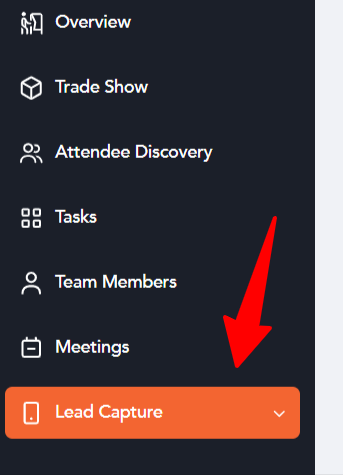
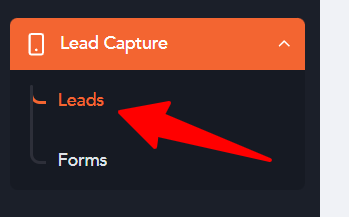
**Step 3: Click "Leads"**
From the expanded menu, click **Leads**. This takes you to the Leads page, where all your captured leads are listed with details such as First Name, Last Name, Email, Phone Number, Lead Type, Booth Name, and Created By.
**Step 4: Click the Export Button**
At the top right of the screen, click the **Export** button.

**Step 5: Enter Your Email Address**
A pop-up titled **Export Leads Report** will appear. Enter your email address in the **Email Address** field.

**Step 6: Click Export**
Click the **Export** button at the bottom right of the pop-up. Your leads will be exported and the report will be sent to the email address you entered.
That's it! You've successfully exported your leads, and the report will arrive in your inbox shortly.
- [Overview/Exhibitor Dashboard](https://help.vfairs.com/exhibitors/overview-exhibitor-dashboard?hsLang=en)
- [Configure Booth](https://help.vfairs.com/exhibitors/configure-booth?hsLang=en)
- [Attendee Discovery](https://help.vfairs.com/exhibitors/attendee-discovery?hsLang=en)
- [Tasks Management](https://help.vfairs.com/exhibitors/tasks-management?hsLang=en)
- [Team Members](https://help.vfairs.com/exhibitors/team-members?hsLang=en)
- [Meetings](https://help.vfairs.com/exhibitors/meetings?hsLang=en)
- [Lead Capture](https://help.vfairs.com/exhibitors/lead-capture?hsLang=en)
- [Trade Show](https://help.vfairs.com/exhibitors/trade-show?hsLang=en)
[.webp?width=107&height=44&name=vfairs-logo-landscape-gradient-5%20(3).webp "vfairs-logo-landscape-gradient-5 (3)")](http://vfairs.com)
vfairs.com Help Center
Copyright © 2026, vFairs LLC