---
title: Understanding Task Management Module as an Exhibitor
description: The Task Management Module simplifies task assignment and tracking for exhibitors. Exhibitors can view, complete, and upload necessary documents for their tasks
---
[Skip to content](https://help.vfairs.com/exhibitors/utask-management-module#main-content)
English
Show submenu for translations
Open main navigation
Close main navigation
- English
Show submenu for translations
How can we help you?
- There are no suggestions because the search field is empty.
1. [Exhibitor Knowledge Base](https://help.vfairs.com/exhibitors?hsLang=en)
2. [Tasks Management](https://help.vfairs.com/exhibitors/tasks-management?hsLang=en)
# Understanding Task Management Module as an Exhibitor
## The Task Management Module simplifies task assignment and tracking for exhibitors. Exhibitors can view, complete, and upload necessary documents for their tasks
#### **Accessing Tasks**
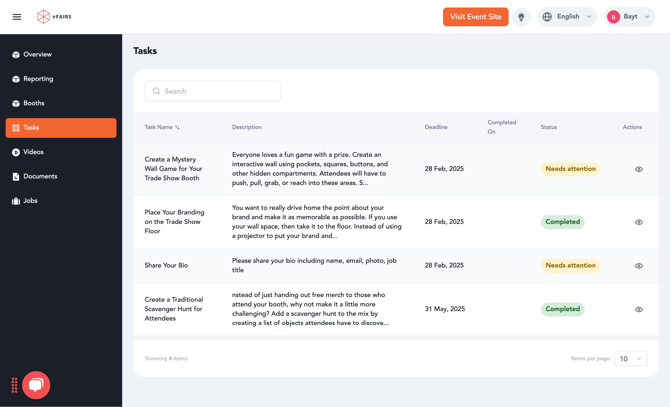
- Exhibitors can view their assigned tasks by navigating to the **Task Menu**.
- The task listing provides details such as:
- **Task Name**
- **Deadline**
- **Task Status**
#### **Interacting with Tasks**
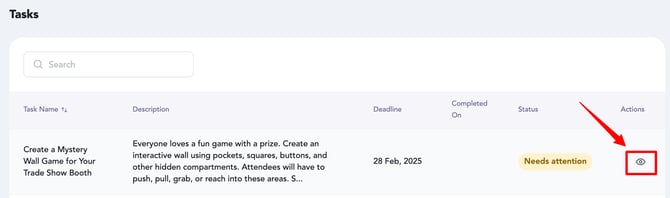
- Exhibitors can expand a task by clicking on the **Eye Icon**, which allows them to:
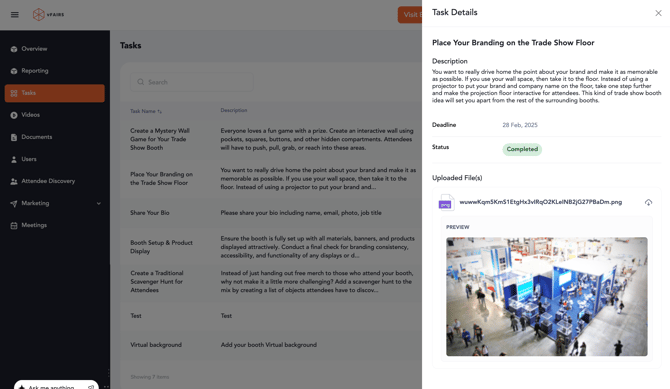
- View the task details, description, and any uploaded documents.
- Mark the task as completed.
- Upload documents (if required) before marking the task as complete.
#### **Marking Tasks as Completed**
- Once a task is marked as completed, the task status changes to **Completed**.
- If the same task is assigned to multiple primary booth representatives of the same booth, completing it by any one representative will mark it as completed for all.
#### Emails Communication:
- When a task is assigned to a booth administrator, an email notification will be sent to them containing all the relevant task details.
- Similarly, upon completion of a task by the booth administrator, a notification of the task's completion will be sent to all event owner and booth admin.
- **Task Reminder Email:** This email is not set up by default, to send the reminder email, make sure to enable the "Send Weekly Reminder Email" toggle in the task, and the task reminder email template is set up in system emails.
*Note: Task reminder email goes on weekly basis by evaluating the task deadline.*
- [Overview/Exhibitor Dashboard](https://help.vfairs.com/exhibitors/overview-exhibitor-dashboard?hsLang=en)
- [Configure Booth](https://help.vfairs.com/exhibitors/configure-booth?hsLang=en)
- [Attendee Discovery](https://help.vfairs.com/exhibitors/attendee-discovery?hsLang=en)
- [Tasks Management](https://help.vfairs.com/exhibitors/tasks-management?hsLang=en)
- [Team Members](https://help.vfairs.com/exhibitors/team-members?hsLang=en)
- [Meetings](https://help.vfairs.com/exhibitors/meetings?hsLang=en)
- [Lead Capture](https://help.vfairs.com/exhibitors/lead-capture?hsLang=en)
- [Trade Show](https://help.vfairs.com/exhibitors/trade-show?hsLang=en)
[.webp?width=107&height=44&name=vfairs-logo-landscape-gradient-5%20(3).webp "vfairs-logo-landscape-gradient-5 (3)")](http://vfairs.com)
vfairs.com Help Center
Copyright © 2026, vFairs LLC