Step 1: Open Abstract Management
- Log in to the event backend as an administrator.
- Navigate to Abstract Management.
- Open the Users listing.
Step 2: Find the Submitter
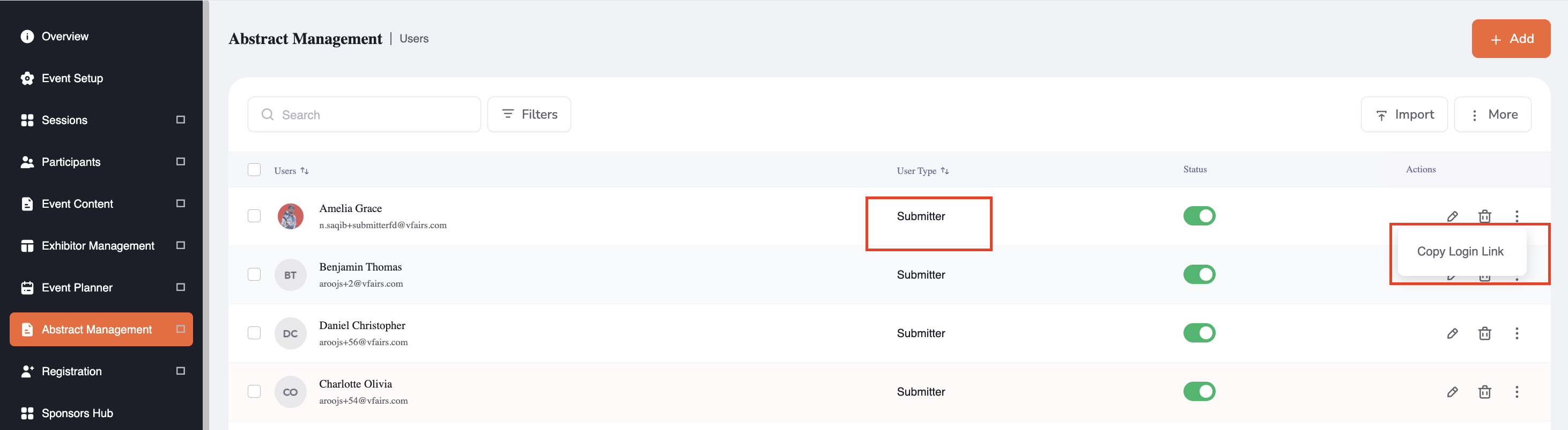
- Locate the Submitter you want to provide access to.
- Open the user's Action Menu.
Step 3: Copy the Direct Login Link
- Select Copy Direct Login Link.
- The system generates a secure, user-specific link for the Submitter.
- The link is automatically copied to your clipboard.
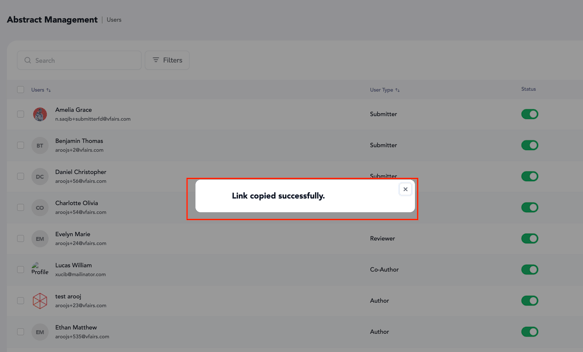
- A confirmation message appears:
Direct login link copied successfully.
You can now share the link with the Submitter through your preferred communication channel.
Step 4: Submitter Opens the Link
When the Submitter opens the shared link:
- The system validates the link.
- The user's event and Submitter access are identified.
- The user is authenticated through the direct-login mechanism.
- The user is redirected directly to the Submitter Portal dashboard.
The Submitter does not need to navigate through the main event platform to access Abstract Management.
Copy a Direct Login Link for a Reviewer
Step 1: Open the Users Listing
- Navigate to Abstract Management → Users.
- Locate the Reviewer you want to provide access to.
- Open the user's Action Menu.
Step 2: Copy the Direct Login Link
- Select Copy Direct Login Link.
- The system generates a secure, Reviewer-specific link.
- The link is copied to your clipboard.
- A confirmation message appears:
Direct login link copied successfully.
You can now share the link with the Reviewer.
Step 3: Reviewer Opens the Link
When the Reviewer opens the shared link:
- The system validates the link.
- The user's event and Reviewer access are identified.
- The user is authenticated through the direct-login mechanism.
- The user is redirected directly to the Reviewer Portal dashboard.
The Reviewer can then access their assigned submissions and the evaluation functionality available to them.

If the link is:
- Invalid
- Malformed
- Expired
- Associated with an inactive or deleted user
- Associated with a user who no longer has access to the event
the user will not be granted access to the portal.