![vfairs-logo-landscape-white-3.png]](https://help.vfairs.com/hs-fs/hubfs/vfairs-logo-landscape-white-3.png?height=40&name=vfairs-logo-landscape-white-3.png)
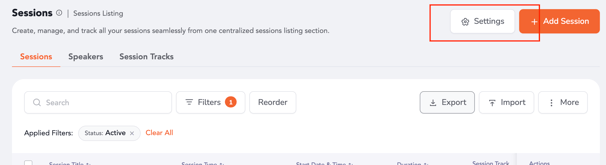
1. Head over to the backend's sessions listing area and access the session settings.
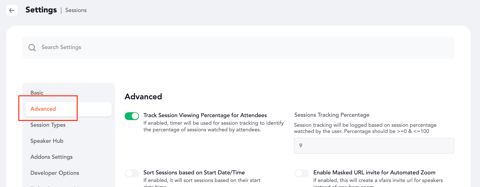
2. Proceed to the "Advanced Settings" section and scroll below.
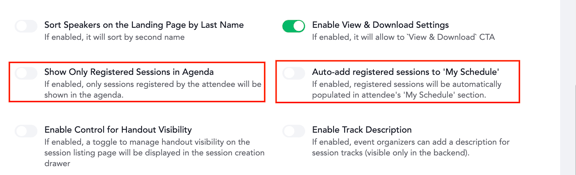
3. Enable the following toggles as per the sessions visibility preference:
Show Only Registered Sessions in Agenda - If enabled, only sessions registered by the attendee will be shown in the agenda.
Auto-add registered sessions to 'My Schedule' - If enabled, registered sessions will be automatically populated in attendee's 'My Schedule' section.
4. Once enabled, the visibility of sessions will be controlled accordingly in the agenda section of the platform.