![vfairs-logo-landscape-white-3.png]](https://help.vfairs.com/hs-fs/hubfs/vfairs-logo-landscape-white-3.png?height=40&name=vfairs-logo-landscape-white-3.png)
- Head over to the sessions listing tab present under Agenda and Speakers module and click on the "Settings" button.

2. Access the "Advanced Settings and scroll down to enable "Allow Same Email for Multiple Roles" toggle. Click Update settings to save.

3. Once enabled, event organizers can add attendee user roles into the system with the same email address through which the users exist as speakers or booth admins in the system.

Note: This functionality is uni-directional, requiring users to already have a booth admin or speaker role in the system before they can be added as attendees using the same email address.
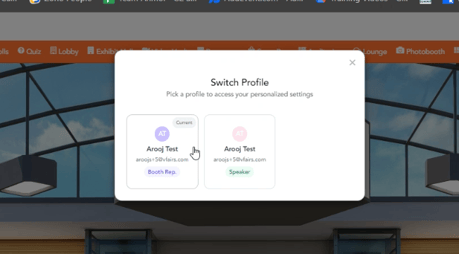
4. As soon as the user logs in to the platform, they'll see a profile switcher pop up that will ask them to select the user role with which they want to exist in the platform.
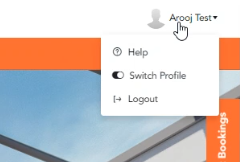
Note: Users can switch between roles at any point of time by clicking on the profile dropdown menu at the top right hand side of the platform.