By default, attendees and speakers can log in to the vFairs Mobile App on multiple devices at the same time. Event organizers can restrict these users to one active device at a time.
When this setting is enabled, logging in on a new device will automatically invalidate the user's previous mobile app session.
Table of Contents
- Enabling the Single-Device Login Restriction
- How the Restriction Works
- Supported User Roles
Enabling the Single-Device Login Restriction
- Log in to your Event Backend.
- Navigate to Mobile App → General Settings.
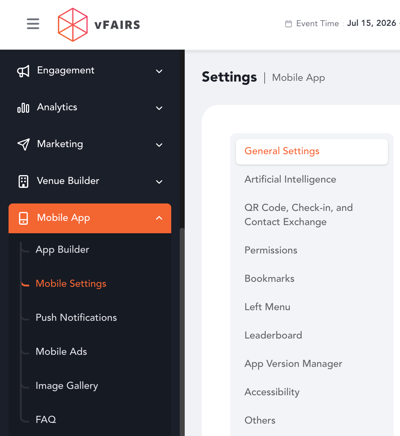
- Find the toggle Prevent Attendees and Speakers from Logging into the App on Multiple Devices at Once.
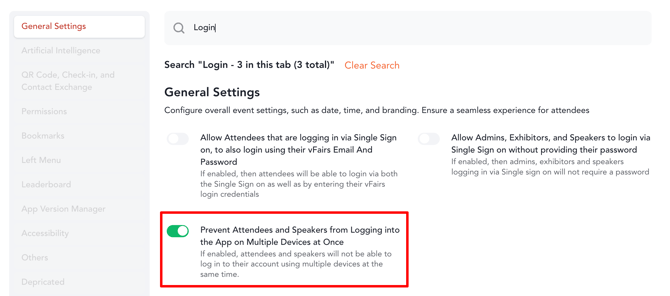
- Enable the toggle.
- Save your changes.
Once enabled, attendees and speakers will be restricted to one device at a time.
How the Restriction Works
For example, if an attendee is already logged in to the Mobile App on their phone and then logs in to the same account on another phone:
- The attendee will be successfully logged in on the new device.
- Their previous device session will be invalidated.
- The logout takes effect when the attendee closes and then reopens the Mobile App on the previous device.
This ensures that the attendee or speaker can only actively use the app from their most recently logged-in device.
Example:
An attendee is logged in on Device A.
They then log in using the same account on Device B.
Result: The attendee remains logged in on Device B, while the session on Device A is invalidated. When they close and reopen the app on Device A, they will need to log in again.
Supported User Roles
This restriction applies only to:
- Attendees
- Speakers
It does not apply to other user roles, including:
- Exhibitors
- Event Organizers
- Event Admins
These users can continue to log in to the Mobile App from multiple devices.