Table of Contents
- Requesting White-Label Access
- Marking an Event as White-Labeled
- Submitting App Requirements
- App Design & Development Process
- App Submission & Approval
- Testing Your Event
1. Requesting White-Label Access
White-label functionality must be enabled by the vFairs team.
To get started:
- Reach out to your vFairs Representative or Project Manager (PM)
- Request to enable White-Labeling for your organization
Note: This setting is not available in the backend and can only be enabled by vFairs staff.
2. Marking an Event as White-Labeled
Once white-labeling is enabled:
- Go to your Organization Dashboard
- Locate your event from the list
- Click the three-dot menu (⋮) on the event
- Select Mark as White-Labeled
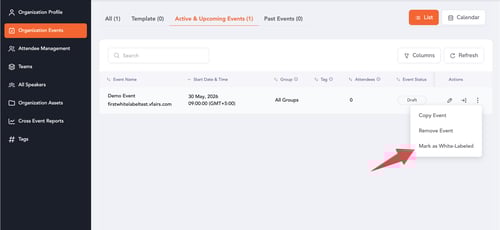
After this:
- A “White-Labeled” tag will appear on the event
To remove this:
- Open the same menu
- Click Remove as White-Labeled
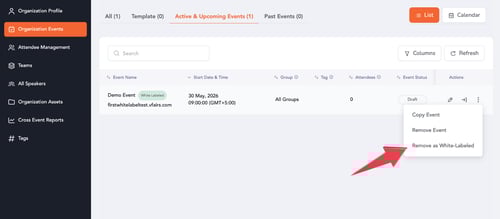
This step associates your event with your white-labeled app.
3. Submitting App Requirements
To create your white-labeled app:
- Contact your Project Manager to receive the White Label App Requirements Intake Form
You will be asked to provide:
- Primary Color (HEX Code)
- Logo
- App Icon Image
- Custom Splash Screen (optional)
- App Title
- Short Description
- Detailed Description, etc.
4. App Design & Development Process
Once your requirements are submitted:
- Your Project Manager will share the details with the Product and Development teams
If a custom splash screen is requested:
- You will receive Figma designs for approval
- Development begins after approval
Timeline: App development typically takes 7–10 working days after form submission / approval
5. App Submission & Approval
After development is complete:
- The app is submitted to:
- Google Play Store
- Apple App Store
Your Project Manager will notify you once submission is complete.
Important
- All white-labeled apps are submitted using vFairs’ developer accounts
- We do not upload apps to client-owned accounts, as we cannot manage or troubleshoot issues that may arise on external accounts
- Approval timelines depend on Google and Apple
- vFairs does not control the review or approval process, but normally the apps are approved within 5 working days
Once approved and live, you will be notified.
6. Testing Your Event
While your white-labeled app is:
- Under development, or
- Pending store approval
You can continue testing your event using the vFairs mobile app.
Note: The functionality remains the same, only the branding differs in the white-labeled app.