---
title: How to utilize AI Tools to generate polls and surveys
description: The vFairs AI Assistant allows users to engage with their audience by generating customized polls, surveys, and quizzes. This tool helps you understand your community better by creating questions that capture insights and opinions.
---
[Skip to content](https://help.vfairs.com/knowledge/how-to-utilize-ai-tools-to-generate-polls-and-surveys#main-content)
English
Show submenu for translations
[Customer portal](https://support.vfairs.com/care?hsLang=en)
Open main navigation
Close main navigation
- English
Show submenu for translations
- [Customer portal](https://support.vfairs.com/care)
Welcome to vFairs Help Center
- There are no suggestions because the search field is empty.
1. [Help Center](https://help.vfairs.com/knowledge?hsLang=en)
2. [Marketing](https://help.vfairs.com/knowledge/marketing?hsLang=en)
3. [AI Assistant](https://help.vfairs.com/knowledge/marketing?hsLang=en#ai-assistant)
# How to utilize AI Tools to generate polls and surveys
## The vFairs AI Assistant allows users to engage with their audience by generating customized polls, surveys, and quizzes. This tool helps you understand your community better by creating questions that capture insights and opinions.
### **Step-by-Step Guide**:
1. #### Access the AI Assistant Tool
Login to the backend and navigate to the ‘Marketing’ section. Click on it to expand and then click ‘AI Assistant’ to access the AI Tools vFairs offer.

Select **Polls and Surveys** from the AI Assistant and click it to open a new screen. 
2. #### **Select the Engagement Type**
Begin by selecting the type of engagement you want to create in the "Select Engagement Type" field. The options available are:

| **Engagement Type** | **Description** |
| --- | --- |
| **Surveys** | Create surveys to gather in-depth feedback from your audience. |
| **Quizzes** | Create quizzes to test knowledge or provide an interactive experience. |
| **Polls** | Create quick polls to gather instant feedback or opinions. |
Note: Selecting the appropriate engagement type ensures the generated content suits your goals.
3. #### **Choose the Survey, Quizzes, or Poll Type**
Depending on the engagement type selected, additional fields may appear:
- **Surveys**: Choose the specific type of survey you want to create:
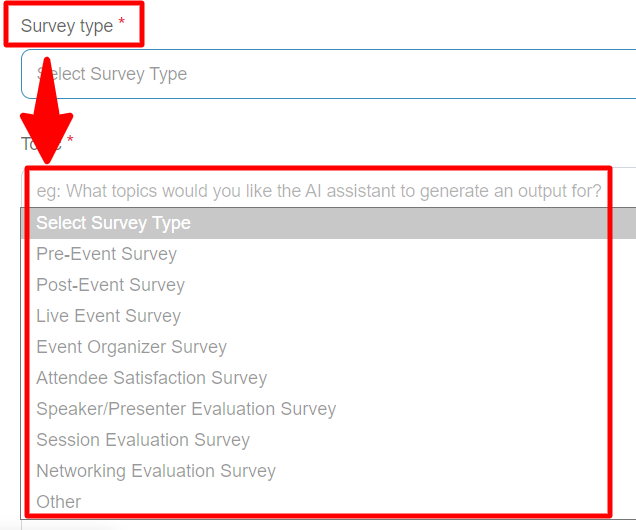
| **Survey Type** | **Description** |
| --- | --- |
| **Pre-Event Survey** | Gather feedback before an event. |
| **Post-Event Survey** | Collect opinions after the event. |
| **Live Event Survey** | Engage attendees during the event. |
| **Event Organizer Survey** | Collect feedback from event organizers. |
| **Attendee Satisfaction** | Measure attendee satisfaction levels. |
| **Speaker Evaluation** | Evaluate speakers or presenters. |
| **Session Evaluation** | Gather feedback on individual sessions. |
| **Networking Evaluation** | Evaluate networking opportunities at the event. |
| **Other** | Custom survey type. |
- Quizzes: Write a Topic for the Quiz you want AI to generate output for.
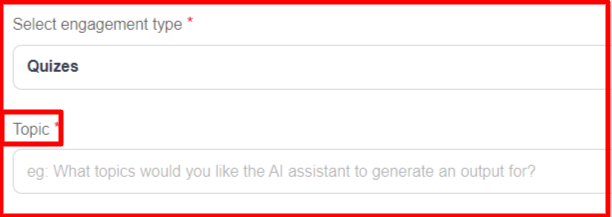
- **Polls**: Choose the type of multiple-choice questions (MCQs):
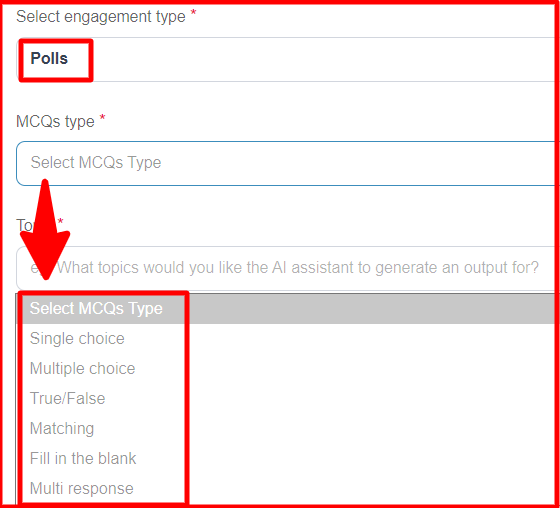
| **MCQ Type** | **Description** |
| --- | --- |
| **Single Choice** | One answer allowed. |
| **Multiple Choice** | Multiple answers allowed. |
| **True/False** | Binary answer (True/False). |
| **Matching** | Match items to their corresponding options. |
| **Fill in the Blank** | Fill in the blank questions. |
| **Multi Response** | Select multiple options from a list. |
4. #### **Enter the Topic**
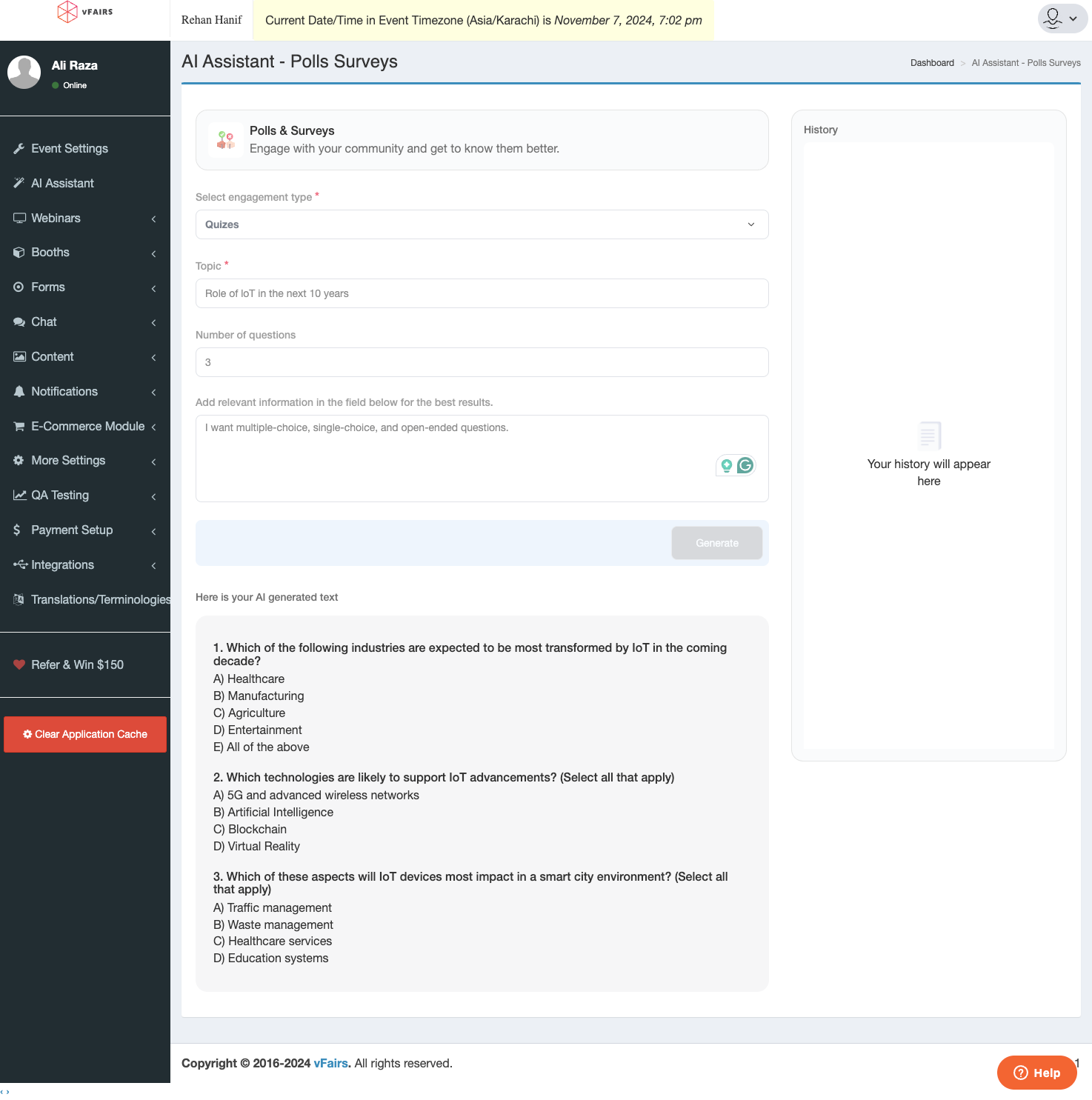
Provide a topic for the poll or survey in the "Topic" field. This helps the AI generate relevant questions that are tailored to your audience.

5. #### **Set the Number of Questions**
Specify the number of questions you want the AI to generate by setting the "Number of Questions" field. This helps you control the length and detail of your survey or poll.

6. #### **Add Relevant Information**
To generate the most suitable questions, add any additional context in the "Add Relevant Information" field. Providing information such as goals or specific details can help the AI create content that matches your objectives.

7. #### **Generate the Poll or Survey**
Once all the relevant options are selected, click the "Generate" button. The AI will create a tailored poll, survey, or quiz based on your input.

8. #### **Review and Edit Generated Content**
The generated questions will appear in the "Generated Text" section. Review the content to ensure it meets your goals and make any necessary edits.
9. #### **View History**
The "History" section keeps a record of previously generated polls and surveys. This feature is helpful for reference, allowing you to track changes and maintain consistency across multiple engagements.
### **Tips for Effective Polls & Surveys:**
- - **Keep Questions Clear**: Ensure that questions are easy to understand and answer.
- **Mix Question Types**: Use different types of questions to keep participants engaged.
- **Limit Length**: Keep surveys and polls short to maintain participants' interest.
- **Review Thoroughly**: Always review AI-generated content to ensure it aligns with your objectives.
- [Organization Management](https://help.vfairs.com/knowledge/organization-management?hsLang=en)
- [Event Setup & Navigation](https://help.vfairs.com/knowledge/event-setup-navigation?hsLang=en#main-content)
- [Document Library](https://help.vfairs.com/knowledge/event-setup-navigation?hsLang=en#document-library)
- [Translations And Labels](https://help.vfairs.com/knowledge/event-setup-navigation?hsLang=en#translations-and-labels)
- [Attendee Management](https://help.vfairs.com/knowledge/attendee-management?hsLang=en)
- [Agenda Management](https://help.vfairs.com/knowledge/agenda-management?hsLang=en#main-content)
- [Session Management](https://help.vfairs.com/knowledge/agenda-management?hsLang=en#session-management)
- [Speaker Management](https://help.vfairs.com/knowledge/agenda-management?hsLang=en#speaker-management)
- [Speaker Management](https://help.vfairs.com/knowledge/speaker-management?hsLang=en)
- [Event Website & Landing Pages](https://help.vfairs.com/knowledge/event-website-landing-pages?hsLang=en#main-content)
- [Web Page Management](https://help.vfairs.com/knowledge/event-website-landing-pages?hsLang=en#web-page-management)
- [Registration & Ticketing](https://help.vfairs.com/knowledge/registration-ticketing?hsLang=en#main-content)
- [Registration](https://help.vfairs.com/knowledge/registration-ticketing?hsLang=en#registration)
- [Ticketing](https://help.vfairs.com/knowledge/registration-ticketing?hsLang=en#ticketing)
- [Payments](https://help.vfairs.com/knowledge/registration-ticketing?hsLang=en#payments)
- [Exhibitor Management](https://help.vfairs.com/knowledge/exhibitor-management?hsLang=en#main-content)
- [Booth Negotiation](https://help.vfairs.com/knowledge/exhibitor-management?hsLang=en#booth-negotiation)
- [Task Management](https://help.vfairs.com/knowledge/exhibitor-management?hsLang=en#task-management)
- [Booth Management](https://help.vfairs.com/knowledge/exhibitor-management?hsLang=en#booth-management)
- [Document / Video](https://help.vfairs.com/knowledge/exhibitor-management?hsLang=en#document-video)
- [Jobs](https://help.vfairs.com/knowledge/exhibitor-management?hsLang=en#jobs)
- [Sponsor Management](https://help.vfairs.com/knowledge/sponsor-management?hsLang=en)
- [Networking](https://help.vfairs.com/knowledge/networking?hsLang=en#main-content)
- [Chat](https://help.vfairs.com/knowledge/networking?hsLang=en#chat)
- [Chat Queue](https://help.vfairs.com/knowledge/networking?hsLang=en#chat-queue)
- [Video Matchmaking](https://help.vfairs.com/knowledge/networking?hsLang=en#video-matchmaking)
- [Reports](https://help.vfairs.com/knowledge/networking?hsLang=en#reports)
- [Meeting](https://help.vfairs.com/knowledge/networking?hsLang=en#meeting)
- [Engagement](https://help.vfairs.com/knowledge/engagement?hsLang=en#main-content)
- [Certificate Management](https://help.vfairs.com/knowledge/engagement?hsLang=en#certificate-management)
- [Scavenger Hunt](https://help.vfairs.com/knowledge/engagement?hsLang=en#scavenger-hunt)
- [Notifications](https://help.vfairs.com/knowledge/engagement?hsLang=en#notifications)
- [Survey](https://help.vfairs.com/knowledge/engagement?hsLang=en#survey)
- [LeaderBoard](https://help.vfairs.com/knowledge/engagement?hsLang=en#leaderboard)
- [Quiz](https://help.vfairs.com/knowledge/engagement?hsLang=en#quiz)
- [Reports & Analytics](https://help.vfairs.com/knowledge/reports-analytics?hsLang=en#main-content)
- [Registration and Ticketing](https://help.vfairs.com/knowledge/reports-analytics?hsLang=en#registration-and-ticketing)
- [User Journey Tracker](https://help.vfairs.com/knowledge/reports-analytics?hsLang=en#user-journey-tracker)
- [Post Event PDF Report](https://help.vfairs.com/knowledge/reports-analytics?hsLang=en#post-event-pdf-report)
- [Survey](https://help.vfairs.com/knowledge/reports-analytics?hsLang=en#survey)
- [Cross Event Report & Reporting 360](https://help.vfairs.com/knowledge/reports-analytics?hsLang=en#cross-event-report-reporting-360)
- [Marketing](https://help.vfairs.com/knowledge/marketing?hsLang=en#main-content)
- [Email Campaigns](https://help.vfairs.com/knowledge/marketing?hsLang=en#email-campaigns)
- [System Emails](https://help.vfairs.com/knowledge/marketing?hsLang=en#system-emails)
- [SMS Campaign](https://help.vfairs.com/knowledge/marketing?hsLang=en#sms-campaign)
- [AI Assistant](https://help.vfairs.com/knowledge/marketing?hsLang=en#ai-assistant)
- [Social Meta](https://help.vfairs.com/knowledge/marketing?hsLang=en#social-meta)
- [Web Notifications](https://help.vfairs.com/knowledge/marketing?hsLang=en#web-notifications)
- [Accommodation & Budget Management](https://help.vfairs.com/knowledge/accommodation-budget-management?hsLang=en#main-content)
- [Accommodation](https://help.vfairs.com/knowledge/accommodation-budget-management?hsLang=en#accommodation)
- [Attendee Mobile App](https://help.vfairs.com/knowledge/attendee-mobile-app?hsLang=en#main-content)
- [Event Assistant](https://help.vfairs.com/knowledge/attendee-mobile-app?hsLang=en#event-assistant)
- [Getting Started & App Access](https://help.vfairs.com/knowledge/attendee-mobile-app?hsLang=en#getting-started-app-access)
- [Build & Customize Your App](https://help.vfairs.com/knowledge/attendee-mobile-app?hsLang=en#build-customize-your-app)
- [Legacy App](https://help.vfairs.com/knowledge/attendee-mobile-app?hsLang=en#legacy-app)
- [Sessions & Event Content](https://help.vfairs.com/knowledge/attendee-mobile-app?hsLang=en#sessions-event-content)
- [Engagement & Networking](https://help.vfairs.com/knowledge/attendee-mobile-app?hsLang=en#engagement-networking)
- [Event Operations & Insights](https://help.vfairs.com/knowledge/attendee-mobile-app?hsLang=en#event-operations-insights)
- [Lead Capture App](https://help.vfairs.com/knowledge/lead-capture-app?hsLang=en#main-content)
- [Reporting 360](https://help.vfairs.com/knowledge/lead-capture-app?hsLang=en#reporting-360)
- [Badge Printing & Check-in App](https://help.vfairs.com/knowledge/badge-printing-check-in-app?hsLang=en#main-content)
- [Printers](https://help.vfairs.com/knowledge/badge-printing-check-in-app?hsLang=en#printers)
- [Badge Design](https://help.vfairs.com/knowledge/badge-printing-check-in-app?hsLang=en#badge-design)
- [Integrations](https://help.vfairs.com/knowledge/integrations?hsLang=en#main-content)
- [Custom Workflow](https://help.vfairs.com/knowledge/integrations?hsLang=en#custom-workflow)
- [E-commerce](https://help.vfairs.com/knowledge/e-commerce?hsLang=en#main-content)
- [Product Management](https://help.vfairs.com/knowledge/e-commerce?hsLang=en#product-management)
- [Allowance Negotiation](https://help.vfairs.com/knowledge/e-commerce?hsLang=en#allowance-negotiation)
- [Venue Builder](https://help.vfairs.com/knowledge/venue-builder?hsLang=en)
- [Abstract Management](https://help.vfairs.com/knowledge/abstract-management?hsLang=en)
- [Group Meeting](https://help.vfairs.com/knowledge/group-meeting?hsLang=en)
- [Exhibitor Portal](https://help.vfairs.com/knowledge/exhibitor-portal?hsLang=en#main-content)
- [Booth](https://help.vfairs.com/knowledge/exhibitor-portal?hsLang=en#booth)
- [Search Attendee](https://help.vfairs.com/knowledge/search-attendee?hsLang=en)
- [Data Tags](https://help.vfairs.com/knowledge/data-tags?hsLang=en)
- [Organization Website](https://help.vfairs.com/knowledge/organization-website?hsLang=en)
- [AI Tools](https://help.vfairs.com/knowledge/ai-tools?hsLang=en)
[-1.webp?width=107&height=44&name=vfairs-logo-landscape-gradient-5%20(3)-1.webp "vfairs-logo-landscape-gradient-5 (3)-1")](http://vfairs.com)
vfairs.com Help Center
Copyright © 2026, vFairs LLC